
Download IE7 Tweak Utility – customize internet explorer, restore old interface, internet explorer 7 tweaks, user interface customization, browser customization tool
Overview
IE7 Tweak Utility is a free customization tool designed for users of Internet Explorer 7 on Windows. Its primary purpose is to assist individuals who find the new interface of IE7 difficult to adapt to by restoring familiar design elements from earlier versions of the browser. The app addresses the common user challenge of interface transition fatigue, particularly among long-time users accustomed to older browsing layouts. By offering a range of visual and functional adjustments, it helps users regain comfort and efficiency in their daily browsing routines.
Target users include individuals who value familiarity in their digital tools, especially those working in environments where consistency and speed are critical. This includes office workers, remote employees, and older computer users who may struggle with modern UI changes. The utility is particularly relevant in the context of the early 2000s software ecosystem, where browser updates often caused friction among users reluctant to adopt new designs.
The developer, IE7 Tweak Utility, did not provide additional technical or organizational background. However, the tool’s straightforward functionality and focus on user-centric customization suggest a niche development effort aimed at solving a specific usability issue. Real-world use cases include adjusting toolbar placement for better workflow integration, hiding cluttered menus for a cleaner display, and restoring search bar functionality to match previous versions. Despite its age, the app remains a notable example of user-driven software adaptation in response to platform changes.
Key Features & Functionality
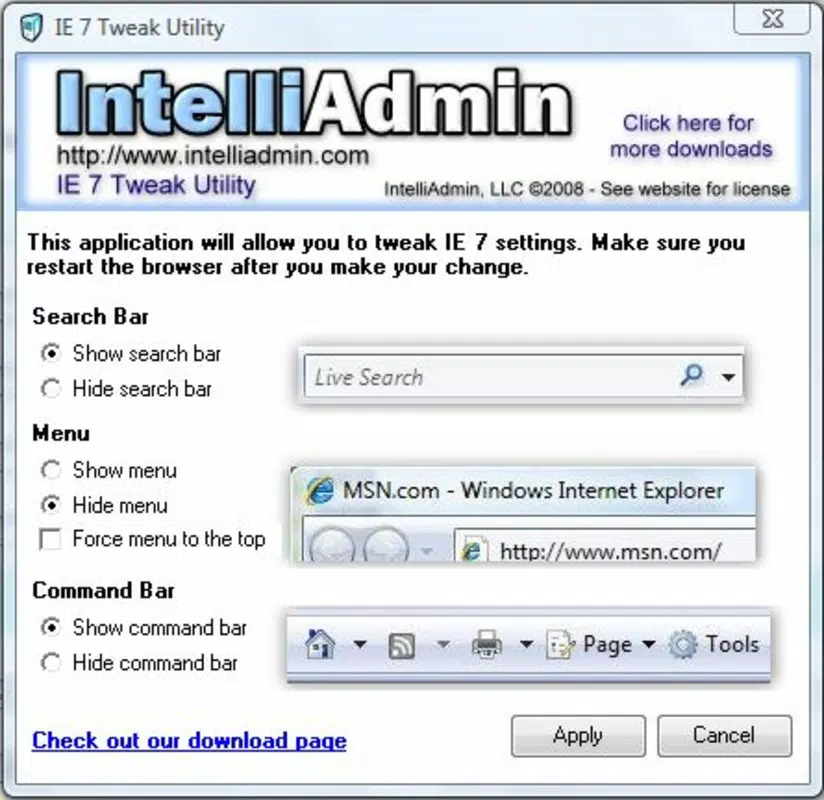
- Custom Search Bar Options: Users can modify the appearance and behavior of the search bar, enabling quicker access to preferred search engines. This feature benefits those who relied on direct search input in earlier IE versions and found the new layout less intuitive.
- Hide Application Menu: The utility allows users to hide the application menu, reducing visual clutter and freeing up screen space. This is ideal for users who prefer a minimalist interface and want to focus solely on web content.
- Toolbar Location Adjustment: Users can reposition the toolbar to better suit their workflow. This flexibility supports diverse usage patterns, from dual-monitor setups to compact screen environments.
- Revert to Familiar Elements: The tool incorporates interface components from previous Internet Explorer versions, bridging the gap between old and new design paradigms. This helps users transition more smoothly without sacrificing comfort.
- User-Friendly Interface: The application features a simple, intuitive layout that requires no technical expertise. This ensures accessibility for users across all experience levels, promoting broader adoption.
Each feature is designed to enhance usability through customization. For example, hiding the application menu can improve focus during research or content consumption. Adjusting the toolbar location may help users with limited screen real estate maintain productivity. These small but meaningful changes collectively contribute to a more personalized and efficient browsing experience.
Interface, UX & Performance
The interface of IE7 Tweak Utility is described as simple and intuitive, aligning with its goal of accessibility for non-technical users. The layout appears to be linear and task-focused, with clear options for each customization setting. Navigation is likely straightforward, involving a series of checkboxes or dropdowns to enable or modify specific features.
Although the developer did not list formal performance metrics, the application’s file size of 1.2 MB suggests it is lightweight and resource-efficient. It is expected to run smoothly on older Windows systems, which were the primary environment for IE7. Responsiveness is likely consistent with typical desktop utilities of its era, though no modern benchmark data is available.
Stability is implied by the tool’s continued availability and use despite its release in 2008. However, no information was provided regarding crash rates, compatibility with newer Windows versions, or updates. Users should be aware that the app was designed for a now-obsolete browser and may not function reliably on current operating systems.
Platform Compatibility & Technical Requirements
IE7 Tweak Utility is designed for Windows, though specific OS versions were not listed. The application is compatible with Internet Explorer 7, which was released in 2006 and is no longer supported by Microsoft. The file size is 1.2 MB, indicating a minimal footprint and low system impact.
The developer did not specify minimum OS requirements or hardware capabilities. As such, compatibility with modern Windows versions (such as Windows 10 or 11) cannot be confirmed. Users should exercise caution when attempting to install the tool on updated systems, as legacy software may encounter security or functionality issues.
Pros and Cons
Pros
- Free to download and use, making it accessible to all users.
- Lightweight at only 1.2 MB, requiring minimal system resources.
- Intuitive interface suitable for users with no technical background.
- Offers targeted customization for Internet Explorer 7 users.
- Helps users adapt to new browser layouts by restoring familiar elements.
Cons
- Designed for an obsolete browser (IE7), limiting relevance today.
- Not compatible with modern Windows operating systems.
- No official updates or support since 2008.
- Security risks may arise from using outdated software.
- Limited to desktop environments, not available for mobile or tablet platforms.
FAQ
Is IE7 Tweak Utility safe to install?
The app is free and was available at the time of its release. However, as it is no longer updated and runs on obsolete software, it may pose security risks on modern systems.
Can I use IE7 Tweak Utility on Windows 10 or 11?
Compatibility with Windows 10 or 11 is not confirmed. The tool was designed for older Windows versions and may not function properly on newer operating systems.
Does IE7 Tweak Utility require administrator privileges?
The developer did not specify whether elevated permissions are required. Users should review their system’s security settings before installation.
Is there a mobile version of IE7 Tweak Utility?
No, the application is designed exclusively for desktop Windows systems and is not available for Android or iOS devices.
How often is IE7 Tweak Utility updated?
The last update was in 2008. No further updates have been released, and the developer has not indicated future development plans.
Final Thoughts + CTA
IE7 Tweak Utility stands as a niche but meaningful tool in the history of browser customization. While its relevance has diminished due to the obsolescence of Internet Explorer 7 and the shift toward modern browsers, it remains a testament to user-driven software adaptation. For users still relying on legacy systems or studying historical software interfaces, it offers a functional way to personalize an outdated browser.
Despite its age, the app’s core strengths—simplicity, low resource usage, and targeted functionality—remain noteworthy. However, modern users are strongly advised to consider more secure and up-to-date alternatives for browser customization. The tool serves best as a historical reference or for specific legacy use cases.
Download IE7 Tweak Utility now


